In my last video, I showed how a coding agent works: a small calculateTotal function with a bug, and Claude reading the files, running the test, and fixing it. In this one, I build the agent itself. About 330 lines of TypeScript, two files, no framework.
The agent loop, again #
Same diagram as last time, because the idea doesn’t change once you’re the one writing it. We prompt the agent, the conversation and any tool calls get sent to Claude’s API, and Claude either asks to run a tool or replies with text. Everything in this video is that loop, built by hand.
Project setup #
You need Node installed. I used Node 24, but anything from 20.12 onward works, since the recursive list_files tool relies on parentPath, which landed in 20.12.
mkdir build-a-coding-agent
cd build-a-coding-agent
npm init -y
npm install @anthropic-ai/sdk
npm install -D typescript tsx @types/node
Set "type": "module" in package.json, and put your key in the environment rather than a file the agent could read:
export ANTHROPIC_API_KEY="sk-ant-..."Step 1: the chat loop #
Everything starts in main.ts. First, a model constant, a couple of colours so you can tell your own messages from Claude’s in the terminal, and an Agent class that takes an Anthropic client, a function for reading the next line of input, and a list of tools.
The loop itself is a while (true): read input, push it onto the conversation, send the whole conversation to Claude, push Claude’s reply back onto the conversation, print any text blocks.
async run(): Promise<void> {
  const conversation: MessageParam[] = [];
  console.log("Chat with Claude (use 'ctrl-c' to quit)");

  while (true) {
    const userInput = await this.getUserMessage();
    if (userInput === null) break;
    conversation.push({ role: "user", content: userInput });

    const message = await this.runInference(conversation);
    conversation.push({ role: "assistant", content: message.content });

    for (const block of message.content) {
      if (block.type === "text") {
        console.log(`Claude: ${block.text}`);
      }
    }
  }
}
That’s the whole shape of it. The model has no memory of its own, so conversation is the agent’s entire memory, and the full array gets resent on every turn.
Step 2: defining tools #
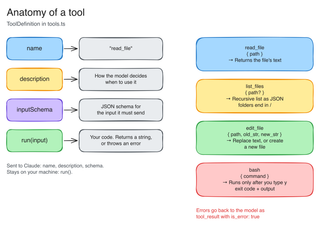
A tool is four things: a name, a description Claude uses to decide when to reach for it, a JSON schema for its input, and the code that actually runs. That shape becomes an interface in tools.ts:
export interface ToolDefinition {
  name: string;
  description: string;
  inputSchema: Anthropic.Tool.InputSchema;
  run: (input: Record<string, unknown>) => Promise<string>;
}
In runInference, the tools get mapped down to just their name, description and input schema before they’re sent to the API:
private runInference(conversation: MessageParam[]): Promise<Message> {
  return this.client.messages.create({
    model: MODEL,
    max_tokens: 16000,
    messages: conversation,
    tools: this.tools.map((tool) => ({
      name: tool.name,
      description: tool.description,
      input_schema: tool.inputSchema,
    })),
  });
}
Worth sitting with: the run function never leaves this machine. Claude only ever sees the name, description and schema, never the code behind them.
Step 3: read_file #
The simplest tool. Given a relative path, return the file’s contents:
export const readFileTool: ToolDefinition = {
  name: "read_file",
  description:
    "Return the contents of a file, given its path relative to the working directory. Only use it on files, not directories.",
  inputSchema: {
    type: "object",
    properties: {
      path: {
        type: "string",
        description: "Relative path of the file to read.",
      },
    },
    required: ["path"],
    additionalProperties: false,
  },
  run: async (input) => readFile(String(input.path), "utf8"),
};
Adding a real tool means changing the loop, though. Up to now every turn waited on you. From here, when Claude asks for a tool, the agent runs it and sends the result straight back without asking you anything, and only returns to the keyboard once Claude has nothing left to ask for. A readUserInput flag tracks which mode the loop is in:
let readUserInput = true;
while (true) {
  if (readUserInput) {
    const userInput = await this.getUserMessage();
    if (userInput === null) break;
    conversation.push({ role: "user", content: userInput });
  }

  const message = await this.runInference(conversation);
  conversation.push({ role: "assistant", content: message.content });

  const toolResults: ToolResult[] = [];
  for (const block of message.content) {
    if (block.type === "text") {
      console.log(`Claude: ${block.text}`);
    } else if (block.type === "tool_use") {
      toolResults.push(
        await this.executeTool(block.id, block.name, block.input),
      );
    }
  }

  if (toolResults.length === 0) {
    readUserInput = true;
    continue;
  }

  readUserInput = false;
  conversation.push({ role: "user", content: toolResults });
}
Step 4: list_files #
Lets Claude look around before it reads anything. Recursive, directories marked with a trailing slash, defaults to the working directory with no path given:
export const listFilesTool: ToolDefinition = {
  name: "list_files",
  description:
    "List every file and directory under a path, recursively. Directories end with a slash. With no path it lists the working directory.",
  inputSchema: {
    type: "object",
    properties: {
      path: {
        type: "string",
        description:
          "Optional relative directory to list. Defaults to the working directory.",
      },
    },
    additionalProperties: false,
  },
  run: async (input) => {
    const dir =
      typeof input.path === "string" && input.path !== "" ? input.path : ".";
    const entries = await readdir(dir, {
      recursive: true,
      withFileTypes: true,
    });
    const files = entries.map((entry) => {
      const rel = path.relative(dir, path.join(entry.parentPath, entry.name));
      return entry.isDirectory() ? `${rel}/` : rel;
    });
    return JSON.stringify(files.sort());
  },
};
No change to the loop this time. Adding a tool is just adding a function and listing it alongside the others.
Step 5: edit_file #
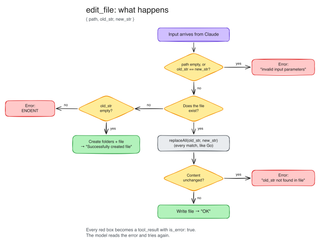
This one does two jobs: replace text in a file that exists, or create one that doesn’t, by passing an empty old_str.
run: async (input) => {
  const filePath = String(input.path ?? "");
  const oldStr = String(input.old_str ?? "");
  const newStr = String(input.new_str ?? "");

  if (filePath === "" || oldStr === newStr) {
    throw new Error("invalid input parameters");
  }

  let original: string;
  try {
    original = await readFile(filePath, "utf8");
  } catch (err) {
    const missing = (err as NodeJS.ErrnoException).code === "ENOENT";
    if (missing && oldStr === "") return createNewFile(filePath, newStr);
    throw err;
  }

  if (oldStr === "" && original !== "") {
    throw new Error("file already exists, so old_str can't be empty");
  }

  const updated = original.replaceAll(oldStr, newStr);
  if (updated === original) {
    throw new Error("old_str not found in file");
  }

  await writeFile(filePath, updated, "utf8");
  return "OK";
},
The errors matter as much as the happy path. Each one becomes a tool result with is_error: true, and Claude reads that error and tries again. That’s the part that looks clever from the outside and is really just: tell the model what went wrong and let it retry.
Step 6: bash #
The riskiest tool, because a shell command can do anything. A few limits go on it before it’s safe enough to demo: a 30-second timeout, a 4,000-character output cap, and detached process spawning so a timeout kills the whole process group, not just the parent.
export function makeBashTool(
  confirm: (command: string) => Promise<boolean>,
): ToolDefinition {
  return {
    name: "bash",
    description: [
      "Run a bash command in the working directory and return its output and exit code.",
      "Use it to run scripts, tests and builds.",
      "The user must approve each command. Commands are stopped after 30 seconds, so don't start servers or anything that waits for input.",
    ].join("\n"),
    inputSchema: {
      type: "object",
      properties: {
        command: { type: "string", description: "The bash command to run." },
      },
      required: ["command"],
      additionalProperties: false,
    },
    run: async (input) => {
      const command = String(input.command ?? "").trim();
      if (command === "") throw new Error("command is empty");

      if (!(await confirm(command))) {
        throw new Error("The user declined to run this command.");
      }

      const { output, exitCode, timedOut } = await runCommand(command);
      if (timedOut) {
        throw new Error(`Command stopped after 30s.\n${output}`);
      }
      if (exitCode !== 0) {
        throw new Error(`Exit code ${exitCode}\n${output}`);
      }
      return `Exit code 0\n${output}`;
    },
  };
}
None of those limits stop a destructive command from running. They stop the agent from hanging or flooding your terminal. The only thing standing between Claude and rm -rf is you reading the command and typing y:
const confirm = async (command: string): Promise<boolean> => {
  const answer = await rl.question(`bash: ${command}\n  Run it? [y/N] `);
  return answer.trim().toLowerCase() === "y";
};
Fixing a failing test with the finished agent #
With all four tools wired in, I ran it against the same project from the last video: total.js, total.test.js, a bug where calculateTotal adds up price but ignores quantity.
First, a dangerous-permissions check. I asked it to delete a throwaway notes file. It proposed rm notes.txt, I approved it, and it deleted the file and listed the directory again to confirm. That’s the whole safety model for bash: the agent proposes, you decide.
Then the real task: “my test is failing, can you fix it.” The agent read the file, found the bug, and proposed an edit: replace sum + item.price with sum + item.price * item.quantity. I approved it, it ran npm test, and both tests passed. No framework, no hidden state, just the loop from the first video, written out in full.
What this is for #
I wouldn’t run this day to day. Claude Code and Codex CLI have a lot more safety checking built in than 330 lines can cover. But building the loop yourself is the fastest way to stop treating “agent” as a black box. It’s a while loop, a tool list, and a permission check, and now you’ve seen all three.
The step order and the three file tools follow Thorsten Ball’s How to Build an Agent, and the bash tool comes from Geoffrey Huntley’s agent workshop notes. Both are worth reading in full. The code for this video is on GitHub, tagged by step if you want to catch up or diff what each one added.