In this video I show you how coding agents work. We take a very simple failing test, get Claude to fix it, and then I explain what’s actually happening behind the scenes.
A broken test #
Here’s the project. A calculateTotal function, and a test file sitting next to it:
// total.js
export function calculateTotal(items) {
  return items.reduce((sum, item) => sum + item.price, 0);
}
// total.test.js
import test from "node:test";
import assert from "node:assert/strict";
import { calculateTotal } from "./total.js";
test("includes the quantity of each item", () => {
const items = [
{ price: 3, quantity: 2 },
{ price: 6, quantity: 1 },
];
assert.equal(calculateTotal(items), 12);
});
test("an empty basket totals zero", () => {
assert.equal(calculateTotal([]), 0);
});Look at calculateTotal and the bug is obvious: it sums item.price and never touches item.quantity. Run npm test and the first test fails. It expects a total of 12 and gets 9, because three times two plus six times one never gets calculated, just three plus six.
Watching Claude fix it #
I ran Claude Code in verbose mode so I could see every step instead of just the final answer. The prompt was simple: the quantity test in total.test.js fails, investigate and make a minimal implementation fix.
With verbose output on, you can watch the tool calls stack up. First ls, to see what’s in the project. Then cat package.json, dumped straight into a bash command. Another ls for JavaScript files. A read on total.js. Then it ran the test to confirm the failure for itself before touching anything.
Each of those is a tool request, and because I had permissions set to manual, Claude stopped and asked before running the test and again before editing the file. Skip that setting and it would have run straight through.
Once it had the test output, Claude proposed the fix: multiply item.price by item.quantity instead of just summing the price. I approved the edit, it ran the tests again, and both passed.
// total.js (fixed)
export function calculateTotal(items) {
  return items.reduce((sum, item) => sum + item.price * item.quantity, 0);
}
One line changed. The test file was never touched.
What a coding agent actually is #
That’s the demo. Now let’s get into what’s actually running underneath it.
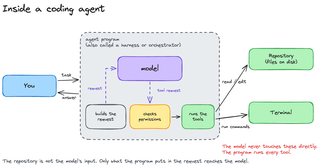
An agent program (also called a harness or an orchestrator) is the piece of software that runs when you type claude on the command line. It takes your task, builds a request, and sends that request to the model. The model can answer directly, or it can ask to use a tool. When it does, the agent checks permissions before running anything.
That’s the part worth sitting with: the model never touches the repository or the terminal directly. It can only ask. The agent program is what actually reads a file, runs a command, or writes an edit, and only after the permission check passes. Everything the agent did in that demo, listing files, catting the package.json, reading total.js, running the test, editing the file, was the agent executing a tool on the model’s request, then feeding the result back.
The loop in detail #
Here’s the same idea, broken out one level further.
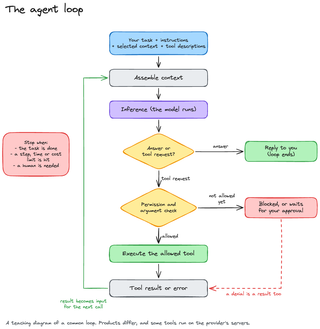
The loop starts with your task, any instructions from the harness, whatever context got selected (files, mostly), and the list of tools available. All of that gets assembled into a request the model can read, and that’s where inference runs: the trained model processing your input.
The model comes back with either an answer or a tool request. An answer ends the loop and you see a reply. A tool request goes through the permission and argument check. If it’s allowed, the agent executes it and the result, or the error, goes straight back into assembling context for the next call. That’s why we saw several tool calls chained together in the demo: read the file, run the test, read the result, edit the file, run the test again. Each result became the input for the next request to the model.
Deny a tool and it doesn’t error out, it just blocks and that denial becomes the result sent back, same as a success would be.
Tokens and the context window #
Before any of that reaches the model, it has to go through a tokenizer. A tokenizer breaks text into tokens, and tokens aren’t the same as words. Some are whole words, some are fragments, some are just punctuation, and where the boundaries fall depends on the specific model’s encoding.
I ran the original calculateTotal function through OpenAI’s tokenizer tool: 99 characters, 25 tokens. Not an obvious ratio, and you don’t need to calculate it by hand, but it’s worth having the concept in your head, because the context window is measured in tokens, not characters or lines.
The context window is the maximum number of tokens a model can process in one request. It’s the model’s entire working memory for that call, and it includes the system prompt, every instruction, the full conversation history resent on every turn, attached documents and images, the tool definitions, tool results, and the model’s own output, including any hidden reasoning tokens. All of it, every single request, because the model has no memory between calls.
That’s why a chat feels continuous even though it isn’t. The whole conversation gets sent back each turn, which is also why long conversations get slower and more expensive as they go. Our demo only used about 25 tokens for the function itself, but the actual request also carried the package.json, the test file, and a list of project files, so the real count was much higher.
Every model has a limit. When you’re using Claude or Codex and it tells you it’s about to compact, that’s the agent summarizing the conversation history so far, turning lines of code and back-and-forth into a short paragraph, to free up room in the context window again. The GPU memory behind the model is finite, and performance degrades as you fill it up, so a fresh conversation can genuinely perform better than one you’ve been running for hours.
Training, inference, and skills #
Three more terms worth separating out, because people mix them up constantly.
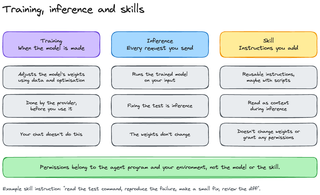
Training is when the model is made: the weights get optimized on data, by the provider, before you ever touch it. Nothing you do in a chat changes the weights.
Inference is what happens in that loop above: the trained model running on your input. Tokenizing the request, then running it. Fixing the test was inference. The weights didn’t move.
Skills are instructions you add on top, usually markdown files, sometimes with scripts. They’re reusable, they get read as context during inference, and they don’t change the weights or grant any permissions. A “fix the test” skill might just be: read the test command, reproduce the failure, make a small fix, review the diff. Same shape every time you use it.
That last point matters more than it sounds: permissions belong to the agent program and your environment, not the model and not the skill. A skill can tell the model what to do, but it can’t grant itself access to anything the harness hasn’t already allowed.
Putting it together #
A coding agent is software running on your machine. It builds a request from your prompt, its own instructions, and the tool descriptions available to it. A tokenizer breaks that down into something the model can process. Inference runs on those tokens and produces either a reply or a tool request.
That’s the loop: request permission, execute on approval, feed the result back into the next request. It might run through several tool calls before replying, because the model has no memory of its own between requests. Close to the context window limit, the agent summarizes the conversation so far to stay under it.
Next up, I build an agent from scratch in TypeScript, so you can see this loop with no framework hiding it: Building a Coding Agent in TypeScript.