It’s such a cliché in the age of AI to build an app with zero knowledge to publishing your own app in the App Store. But I made it happen too. This is now the new reality, those with agency can and will easily build what they desire.
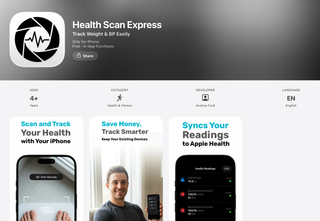
For myself I’m on a health kick after getting an Apple Watch and well middle age happening I’ve started to track my weight consciously. After previously using a smart scale I’d been dissatisfied with what was on offer. There haven’t been a lot of options for reasonably priced smart scales that can save your data to Apple Health. More importantly you may not always be using your own scales to record your weight so an idea formed of an app that can easily save your weight and sync.
I didn’t want any clumsy bluetooth connection that works sometimes. A lot of people simply take a photo of the scales. It’s a simple but elegant solution, but I know I could do one better. We now have access to AI tools that can read text and spit it out into a computer friendly format.
So that’s what I did. I made an app that you take a photo of your scales, send it to a smart AI that can read the weight and then save it to Apple Health. Armed with Xcode, VSCode, Claude Code and a plunger of coffee I’d made a prototype in a couple of hours.
Hours to build an app from scratch barely knowing any Swift that can upload an image, create an API (very rough) get the AI to extract the weight value into JSON and then take that value in the app and save it to the Health App with all the other health data like your steps etc are saved in the one location.
In this article I use Agent which could be Claude Code, Codex, OpenCode, or GitHub Copilot. Pick your poison.
The How #
What I find that works for me is to create a PRD that’s a Product Requirements Document. This need not be made entirely by me. Instead, I work with the Agent iterating on a clear and concise document that covers the MVP (Minimal Viable Product) that will meet what I want to achieve. I write this up in markdown and get it to a point where I’m ready to give it to the Agent. This can take hours to write up but I find it’s worth it to get it clear what I want and how I want it built.
I then create a GitHub repository and add my PRD markdown file to the root. I then run the /init command in Claude Code to add a CLAUDE.md (or AGENTS.md) file. Then I’m ready to give Claude Code my PRD file and ask for it to Plan out the build of the app based on the PRD and also ask it to ask questions if it requires any clarification.
The Agent can sometimes plan for quite some time so be prepared to wait. I find it very good at coming back with questions that help remove any ambiguity.
Once both the Agent and I are happy I ask the Agent to create a TODO.md file of all the tasks it needs to perform. This becomes a check list for both me and the Agent to keep track of the progress.
My personal preference is to keep track of what the Agent does by asking it to do one task at a time. There are a lot of people using the “Ralph Wiggum” skill/script to get the Agent to code while they sleep. It’s a completely valid way to build your app and is worth having a go. I find I like to check in and see what the AI has done. It’s hard to let go of the wheel after 25 years.
In the case of my app Health Scan Express I split the project across 3 git repos. One for the iOS app, one for the NodeJS API and finally a marketing website. Most Agents thankfully have a way to look at other folders using a command like /add-dir <path> so that it knows what the API code looks like when working with the iOS app and vice versa.
This will get you to a reasonably good working prototype of the app you outlined in your PRD. Next, you’ll want to build out the application. To do this and keep a good level of quality within your codebase it’s time to start adding some guard rails to ensure the codebase doesn’t become a mess of spaghetti and flaky.
Guard Rails #
Like all good coding practices they map very well to AI Engineering, putting in place tests and code quality tools all help to keep everything in check including the AI itself.
To start with I add a linting and formatting tool(s) to help keep the code and coding style consistent. For swift we have swiftlint and swiftformat. For TypeScript I’m a fan of biomejs it takes care of linting and formatting. I’d suggest also to use a typed language (swift is strongly typed), again adding guardrails to your codebase to avoid ambiguity of data being passed to functions and models etc.
For the linting and formatting tools there are a couple of ways you can get these to run in your project, git hooks for pre-committing code, Claude Code has its own hooks too that can be configured to run say on write or edit or pre/post tool use.
For end to end testing (e2e) you can add Playwright for web, and UI Tests (XCTest framework) for iOS.
Having all these tests in place is no good if you don’t make them validate before releasing to production. Agents are very good at boilerplate for project setup and that includes putting in place GitHub Actions. That way each pull request I create gets thoroughly tested before merging. This is everything from running unit tests, ensuring the container builds are successful and running subsets of e2e tests.
Debugging and QA #
Using Agents to develop flips the development practice. Rather than writing code, most of my time is now spent on validating that the code made by the Agent is correct and works as intended. While testing, when I find issues I either take a screenshot of the issue, usually with the browser console open and paste that into the Agents input. Or describe the issue in text (sometimes using dictation) of what is wrong, maybe pasting in an error from the browser console. If it’s a UI issue I annotate the screenshot with red arrows and comments, which works remarkably well.
Another option is to enable a browser MCP server (like Claude Chrome MCP server), that can navigate your website in a browser. I create a .env.test file with user accounts for local testing of the development environment for web projects and tell the Agent that these are available. This is great for getting the Agent to investigate issues when debugging a complicated flow letting it sign in to the project and navigate around the app taking screenshots and filling forms.
Code Review #
I still prefer to work adding new features using Pull Requests to perform code review, old habits die hard. But again just like I don’t write all the code I get Agents to review code too. GitHub Copilot can be configured on GitHub to perform code review on PR creation/update and there are many other tools like (Greptile and Code Rabbit) that do the same. Again adding another level of code validation. Claude Code also offers this as a GitHub action and by leaving a comment for @claude to review as well. The review doesn’t have to happen so late in the process. You can always get Agents to review code beforehand. There can be value getting other Agents or fresh Agent sessions to have a second set of eyes too. Surprisingly repeatedly asking the Agent to check their work multiple times works amazingly well.
Documentation #
While I didn’t write the code you will still need to be able to understand at least what’s happening to ensure the code is working as advertised. A good way to get a good understanding without having to read each line is to get the Agent to write documentation of how the project is architected. It’s helpful to open a new session or even use another AI tool Agent to have a fresh set of eyes. I usually create a /docs folder of markdown files and ask the agent to write documentation of how the code is working. To get an easy overview I also get the Agent to create mermaid diagrams (markdown inspired text diagram definitions) of the logic flow where needed.
What did I build #
With the process to building the app out of the way you’re probably asking what did I build? I built an iOS app called Health Scan Express that turns your digital scales or blood pressure monitor into smart versions that can save the reading to Apple Health. The interface is familiar it’s similar to a camera or scanner. You hit the capture button the app captures an image and the AI model returns a result ready to save into Apple Health. While I spent little time getting it built. More time was spent fine tuning the process and making it fast. Adding the payment process, writing testing scripts to compare models and manipulate the images (this made a huge impact on speed). Most of my time building the project was spent in the finishing phases testing and preparing the app for submission for Apple.
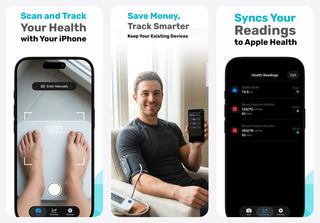
Like I said in the beginning if you have agency and are prepared to learn I believe any developer, designer and product manager can build their own app and get it on the App Store.

Turn your scales and blood pressure monitor into smart devices that sync with Apple Health.